More playtime in 2027. Try PlayDay free for 3 months when you start by December 31. No credit card, then $9.99/month.Start your free trial →
PlayDay logo layDay
Child logs Check-in Messaging Invoicing Calendar Staffing Enrollment Licensing Pricing Log in Start free trialTry 3 months free

Less paperwork. More playtime.

Start the new year organized. You’re the caregiver, the office, and the business owner, all at once. PlayDay runs daily logs, check-in, parent messages, invoices, enrollment and state paperwork from one app — for $9.99 a month flat.Upload your state’s licensing forms once. PlayDay fills them for any child on your roster and flags anything it wasn’t sure about. Logs, check-in, parent messages and invoices are in the same app, for $9.99 a month flat.

Start your free trialTry 3 months free 14 days free · no credit card · cancel anytime 3 months free · no credit card · start by Dec 31 · then $9.99/mo
PlayDay parent app messages and live feed screenshot on a phone

Example with made-up details.

$9.99/month, flat
Every feature, unlimited children, unlimited storage, and everything we ship later. Not per child, not per tier, no add-ons.
14 days free
Run it through two real weeks with your real families before you pay anything. No card up front.
3-month free trial
Start by December 31, set it up over the holiday break, and greet your families in January with everything running. No card up front, then $9.99 a month.
No demo, no sales call
Start today and be logging by the afternoon. Nobody is going to call you.
No more retyping
State forms, shot records, and paper intake packets fill themselves from information you already have.

What providers say

Rated 5 stars on the App Store and Google Play

RachelRainbow Hearts Daycare
I used to spend a whole Sunday on enrollment paperwork for one new child. Now I invite the parent to onboard, they fill in all the info in the app, and PlayDay completes all my licensing forms.
CarmenTiny Treasures Family Child Care
My parents love getting pictures of their child throughout the day. And the logs answer all their questions about naps, meals, and potty.
LinhLinh’s Little Learners
I was paying TOO MUCH for another app built for daycare centers! PlayDay is better and cheaper than others I’ve used.

Switching to PlayDay

Coming from paper, a spreadsheet, or another app? You don’t have to retype everything or do it alone.

Your roster
Import it from a spreadsheet or another app in minutes.
Your paper forms
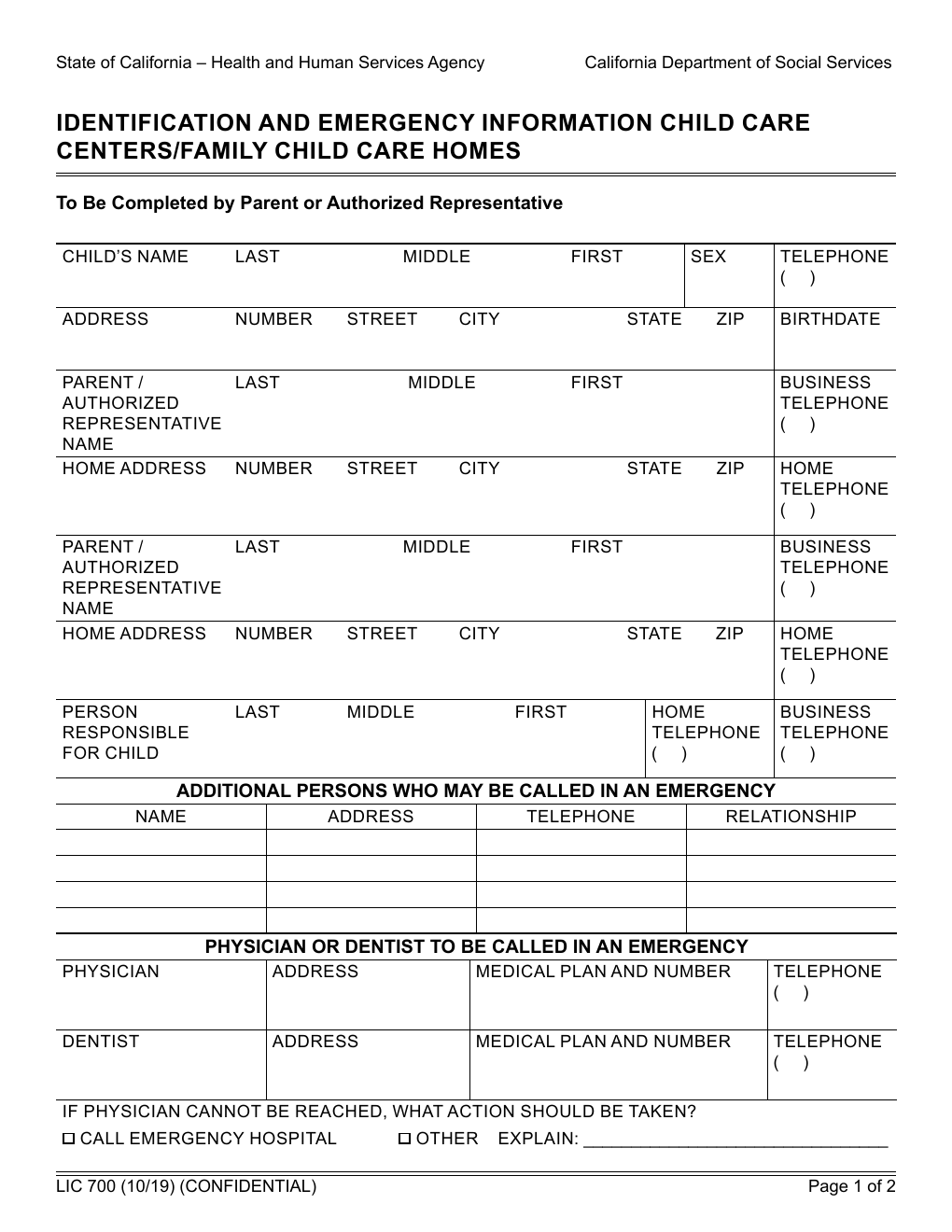
PlayDay can scan them and pull out the child, parent, emergency contact and physician details.
Your families
Email each family a secure link. They fill in their own details from their phone.
Or let us set it up with you
Tell us what you use now and we’ll help you move over, free. Please don’t email children’s records. We’ll walk you through it.
Email us for setup help
Start your free trialTry 3 months free

Child logs

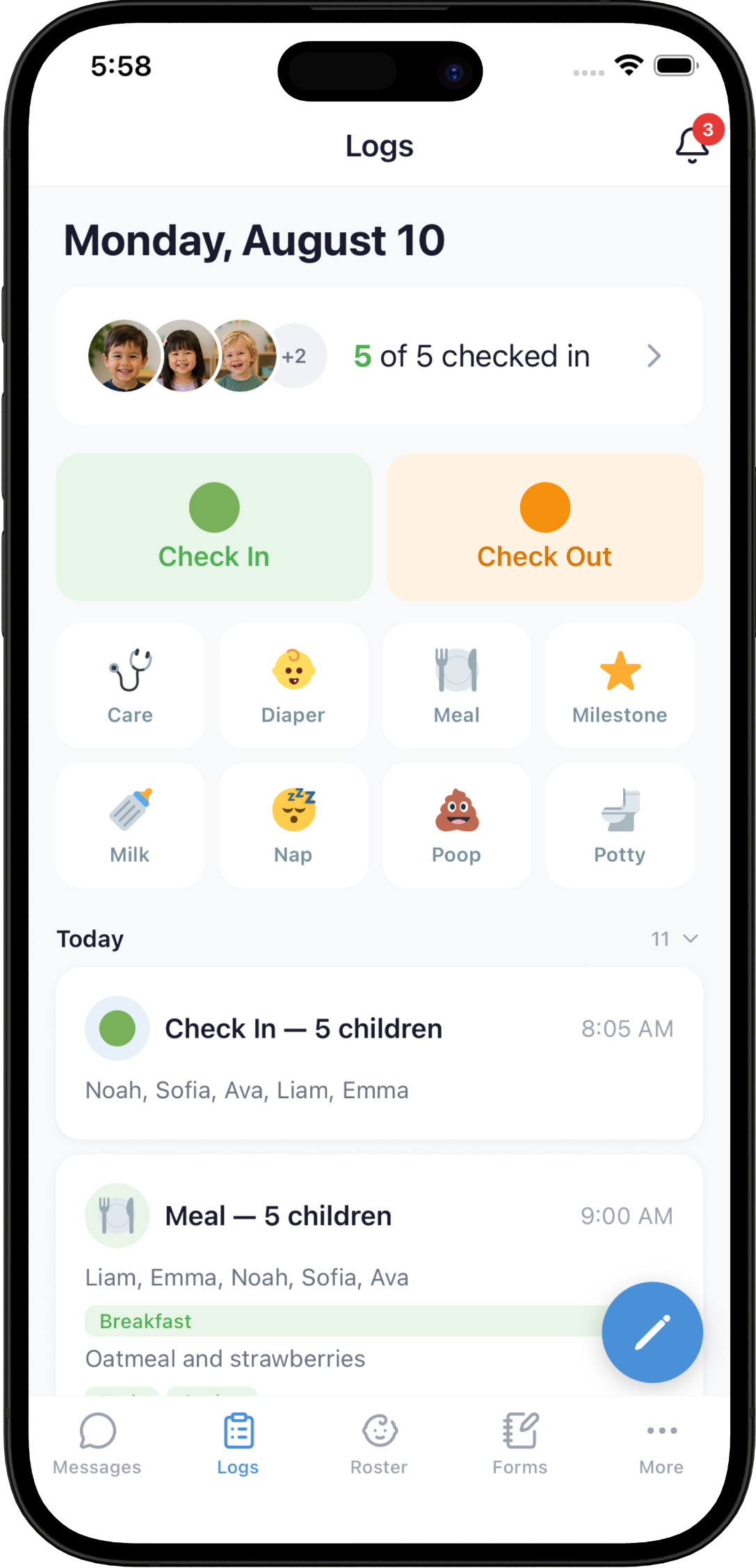
Meals, bottles, diapers, potty, naps, medication, sunscreen and milestones are a couple of taps each — and the same meal or nap can be logged for the whole group at once instead of child by child. Prefer to talk? Say or type a quick note and PlayDay turns it into separate entries for each child.
⏱️ Nap & bottle timers
Timers run from the time you logged and remind you when it’s time to check.
👀 “Needs attention”
Catches a nap that never ended or a child still checked in after closing.
✅ Nothing goes out until you say so
Every log starts as a draft. Parents see nothing until you review the whole day at once and submit it — so you can fix a wrong nap time, clear anything flagged as needing attention, then publish the day at pickup.
PlayDay provider app child log screen

Check-in & check-out

Parents sign their child in and out on their own phone at your door — and can let you know when they’re on the way. Every drop-off and pick-up is time-stamped and signed, so your attendance record keeps itself.
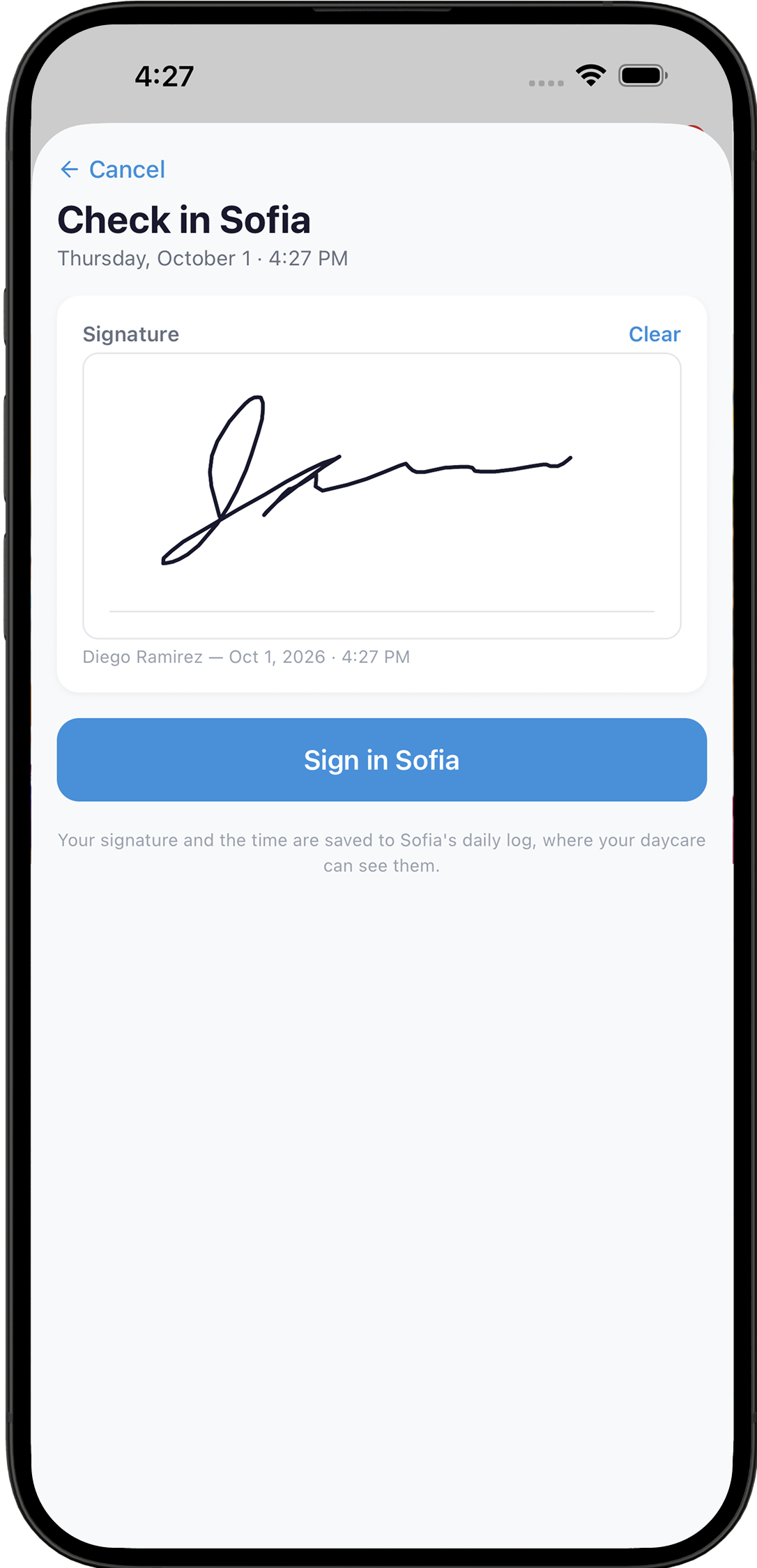
“On my way” → Parent signs on their phone → Time-stamped & signed
Parent signing to check in their child on the PlayDay app, with a time-stamped signature

Parent messaging

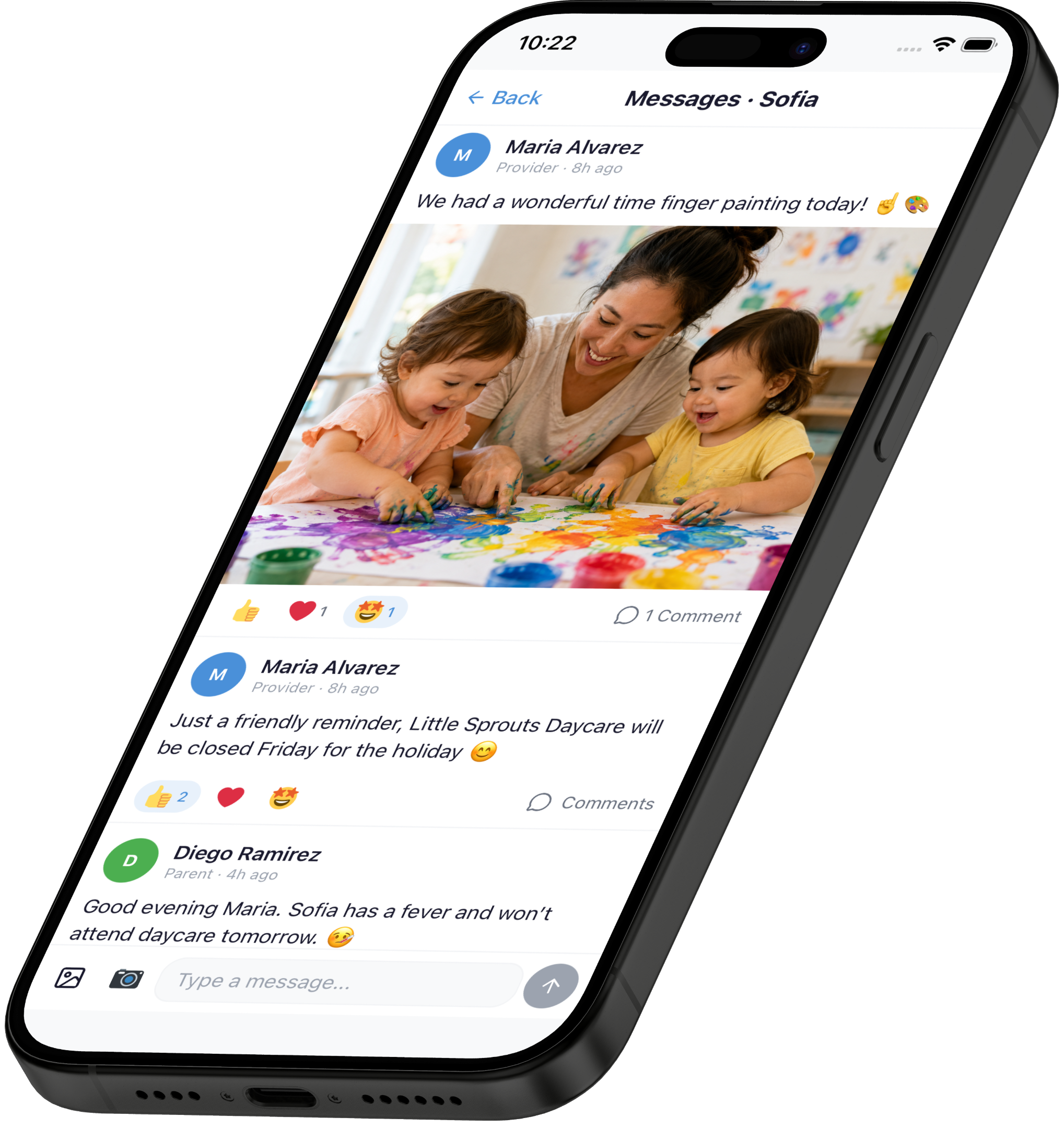
Parents get one feed with their child’s whole day in it, so most questions are answered before anyone asks them. Message one family directly or send an announcement to everyone at once — and it all lands in the app’s inbox, not your personal texts at 8:40 on a Sunday night.
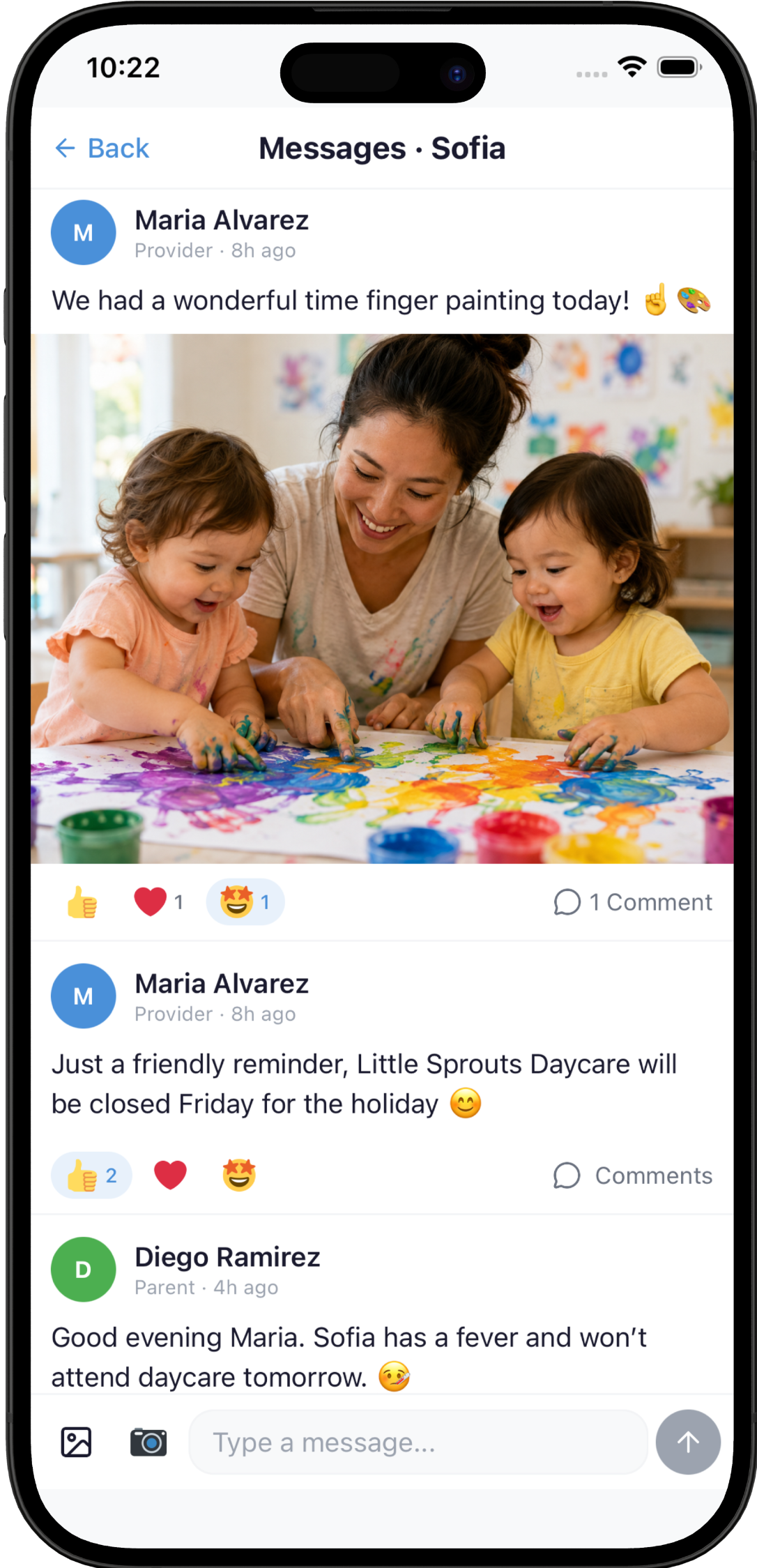
Messages & announcements
Parents can reply and react — all in the app, not your texts
Parents set their own pace
Real-time alerts, or one digest at the end of the day
Siblings together
Brothers and sisters show up in one parent app
PlayDay messages with a photo post, parent reactions and a closure announcement

Invoicing

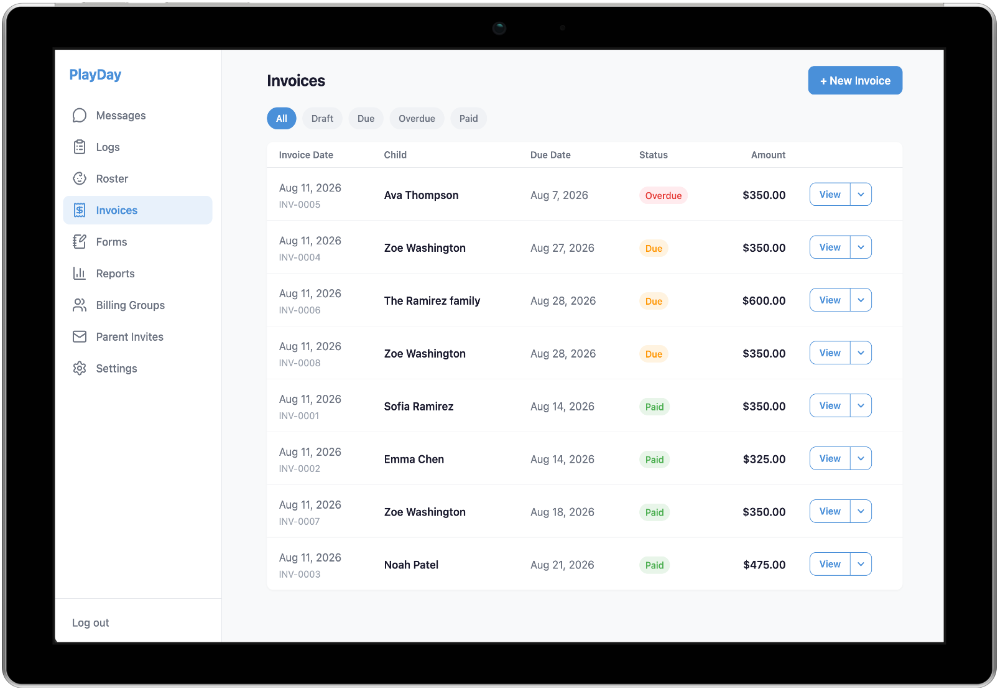
Send professional invoices from the same app you logged the day in, and see exactly where each one stands — due, overdue, or paid. Parents pay straight from their bank account or turn on auto-pay so tuition is collected on the due date — or put your own payment instructions on the invoice, like Zelle, check, or cash.
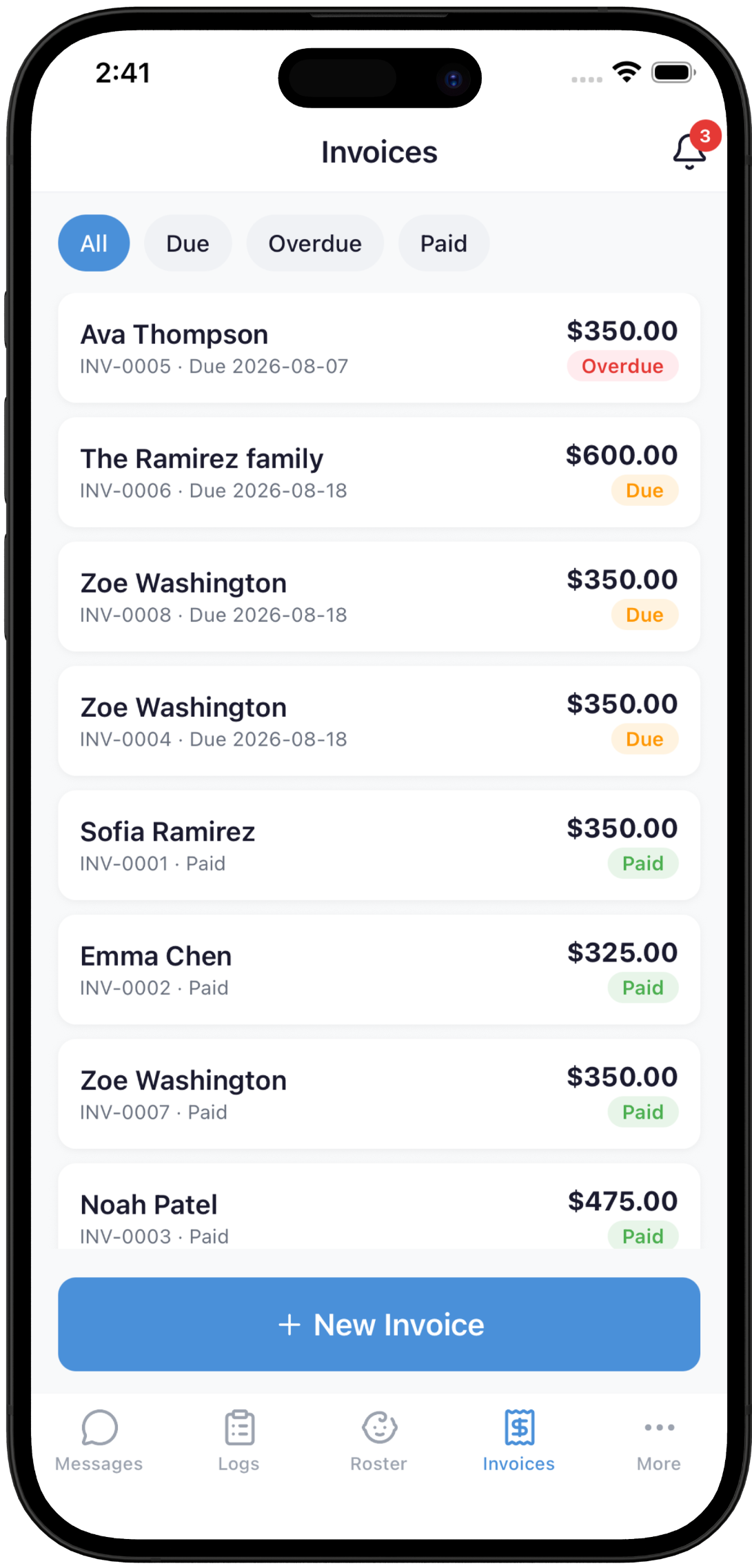
Invoice sent → Auto-pay on the due date → Marked paid automatically
PlayDay invoices screenshot

Food program (CACFP)

Food components are tracked as you log each meal — not reconstructed weeks later from memory. When the month closes, the record is already there.
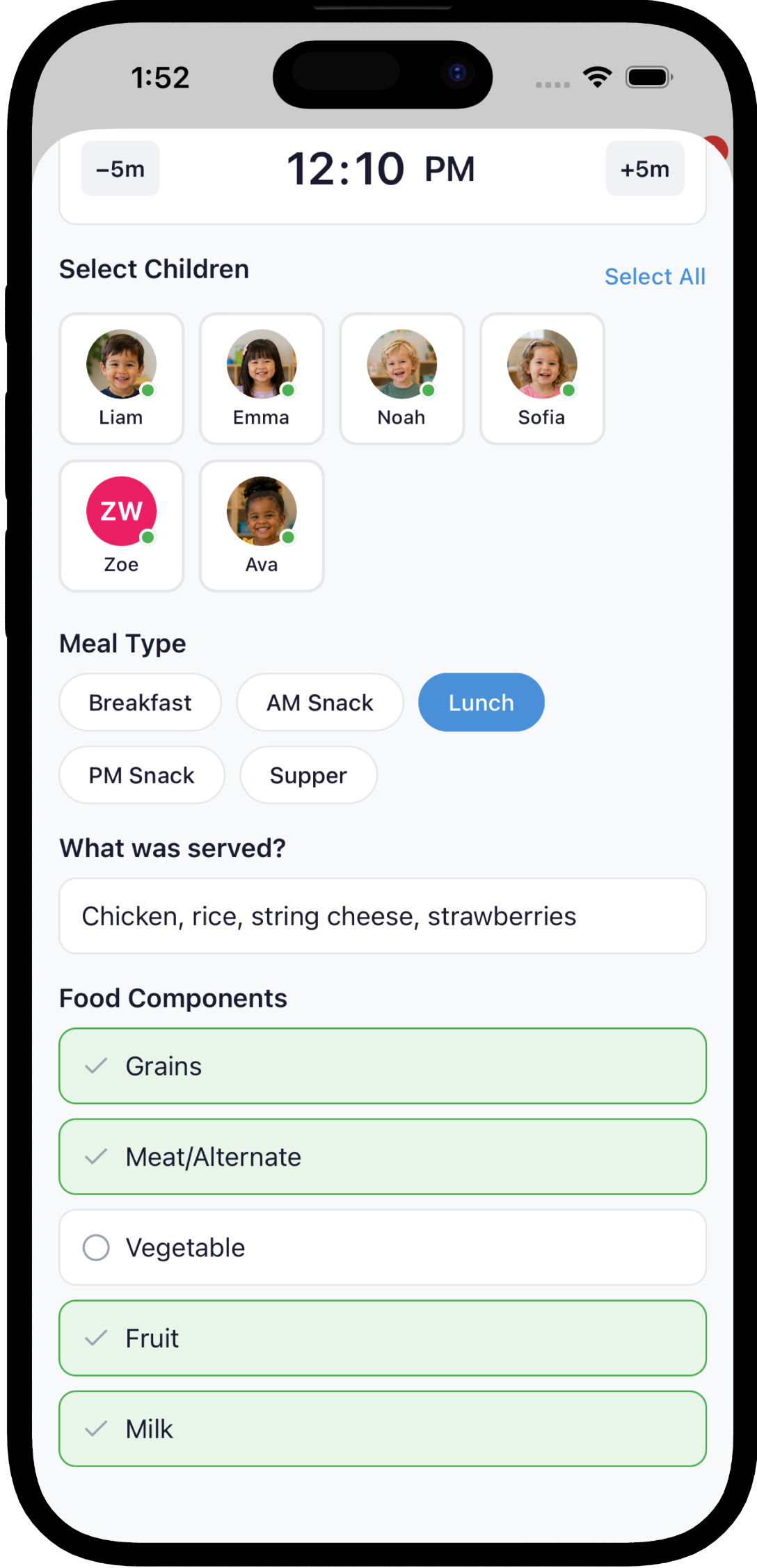
Grains Meat/alternate Vegetable Fruit Milk
📄 Export your monthly CACFP compliance report whenever you need it.
PlayDay CACFP meal log screenshot

Calendar & birthdays

Keep closures, holidays and events on one calendar, and everyone gets a reminder before each one — so no family shows up on a day you’re closed. You’ll also get a heads-up before each child’s birthday, with enough time to plan the cupcakes.
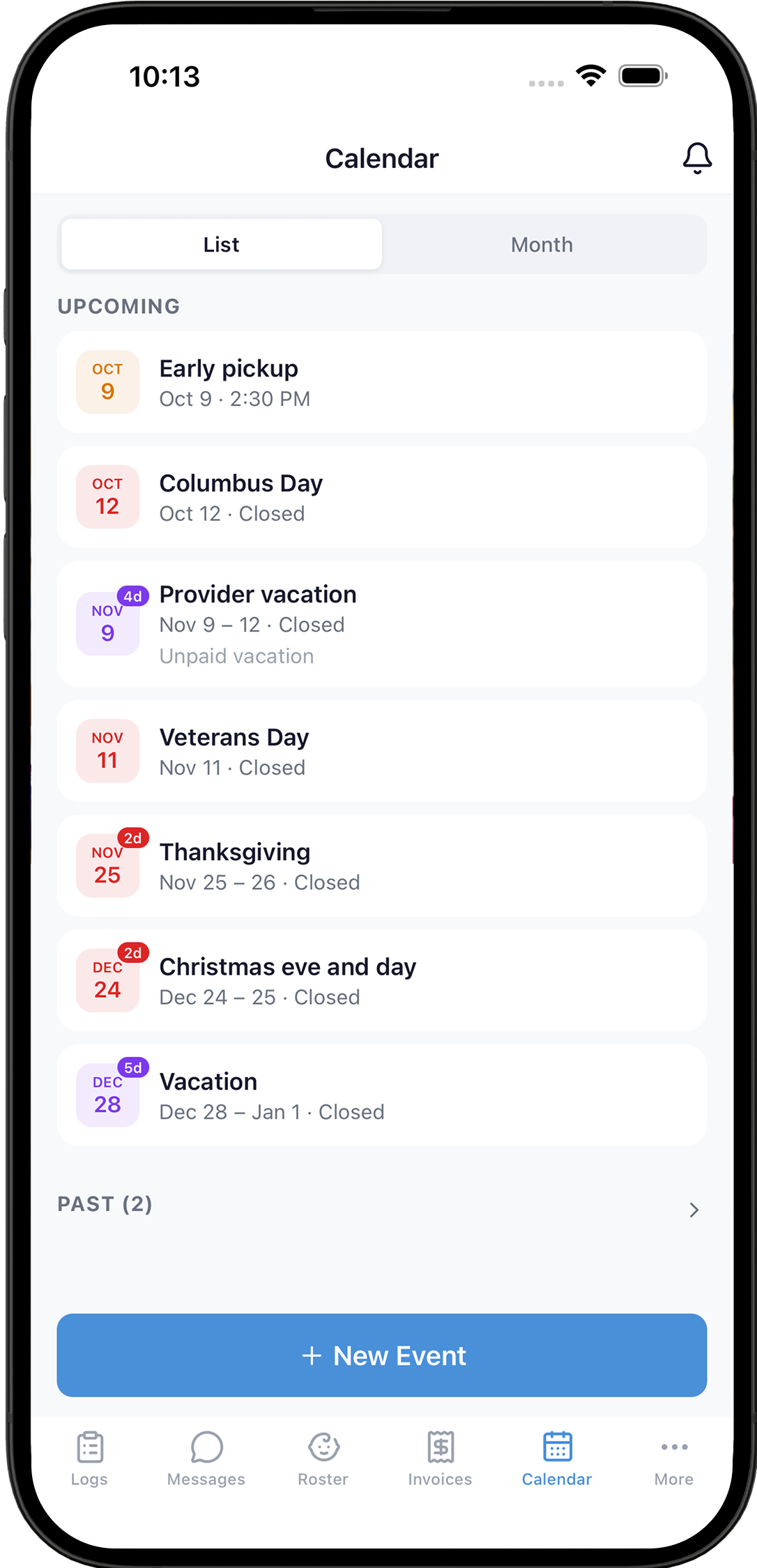
📅 Closures & events 🔔 Event reminders for everyone 🎂 Birthday reminders
PlayDay calendar listing upcoming closures, holidays and an early pickup

Staffing

Schedule your assistants, and they confirm shifts and clock in and out on their own phones. If someone misses a clock-in, calls out, or hasn’t confirmed for tomorrow, you’ll get notified.
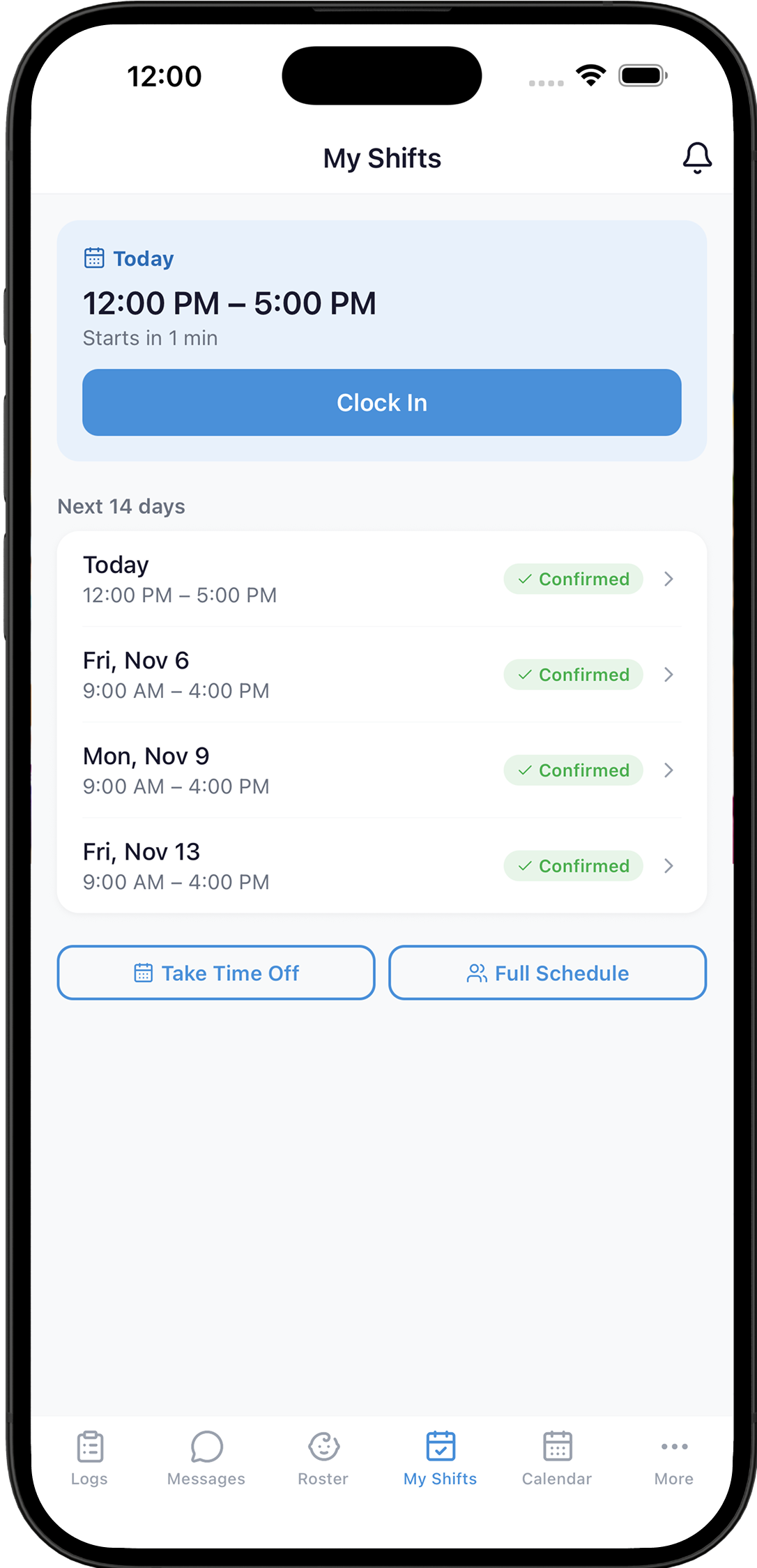
Weekly schedules
Set it once, and shifts keep filling in four weeks ahead
Shifts on their phone
They see upcoming shifts, clock in and out, and request time off
Timesheets
Export clocked hours as a PDF or CSV for your payroll service
PlayDay My Shifts screen with a Clock In button and confirmed upcoming shifts

Enrollment & setup

Build your own intake form from built-in fields and your own questions, then email new families a secure link. They fill it in from their phone, and PlayDay creates the child’s profile and links the parent account automatically. Switching from a spreadsheet, another app, or paper? Import your roster in minutes — and PlayDay can scan existing paper forms and pull out the child, parent, emergency contact and physician details for you.
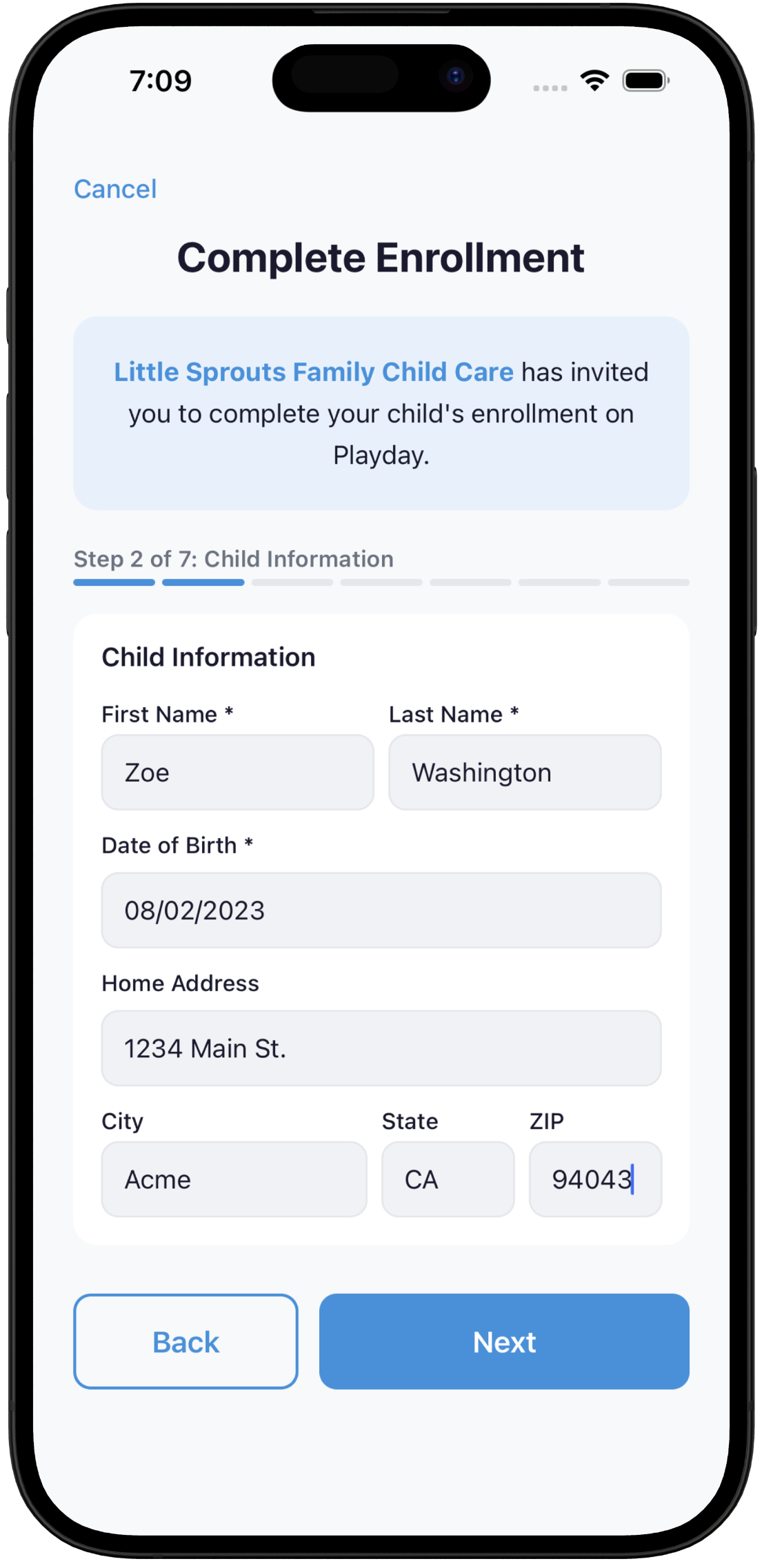
Intake link or paper scan → Profile & parent linked automatically
PlayDay enrollment form a parent completes on their phone

Licensing, immunization & contracts

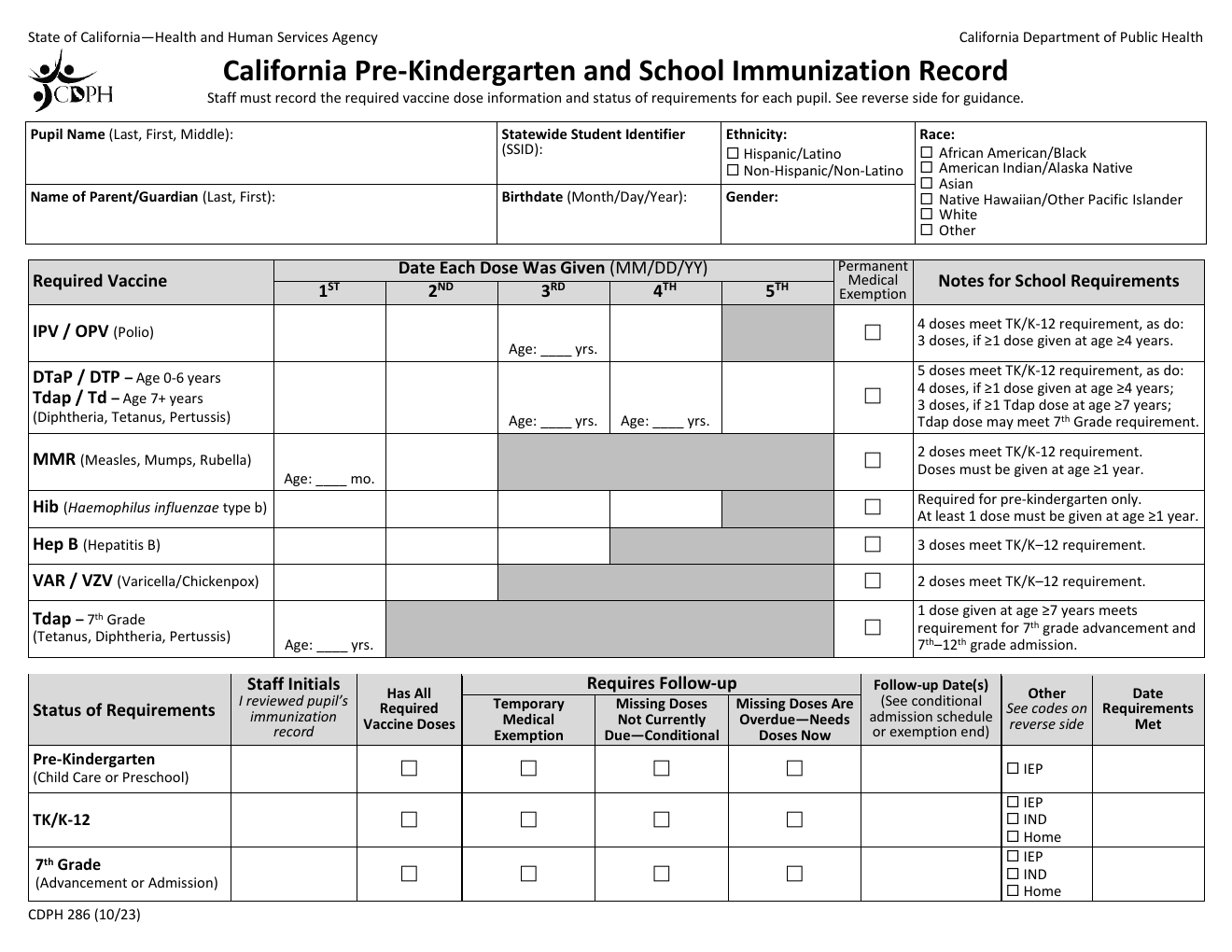
Upload your state’s forms once. PlayDay fills them for any child on your roster using information you already entered — and tells you exactly which fields it wasn’t sure about. You’re reviewing finished documents instead of building each one from a blank PDF.
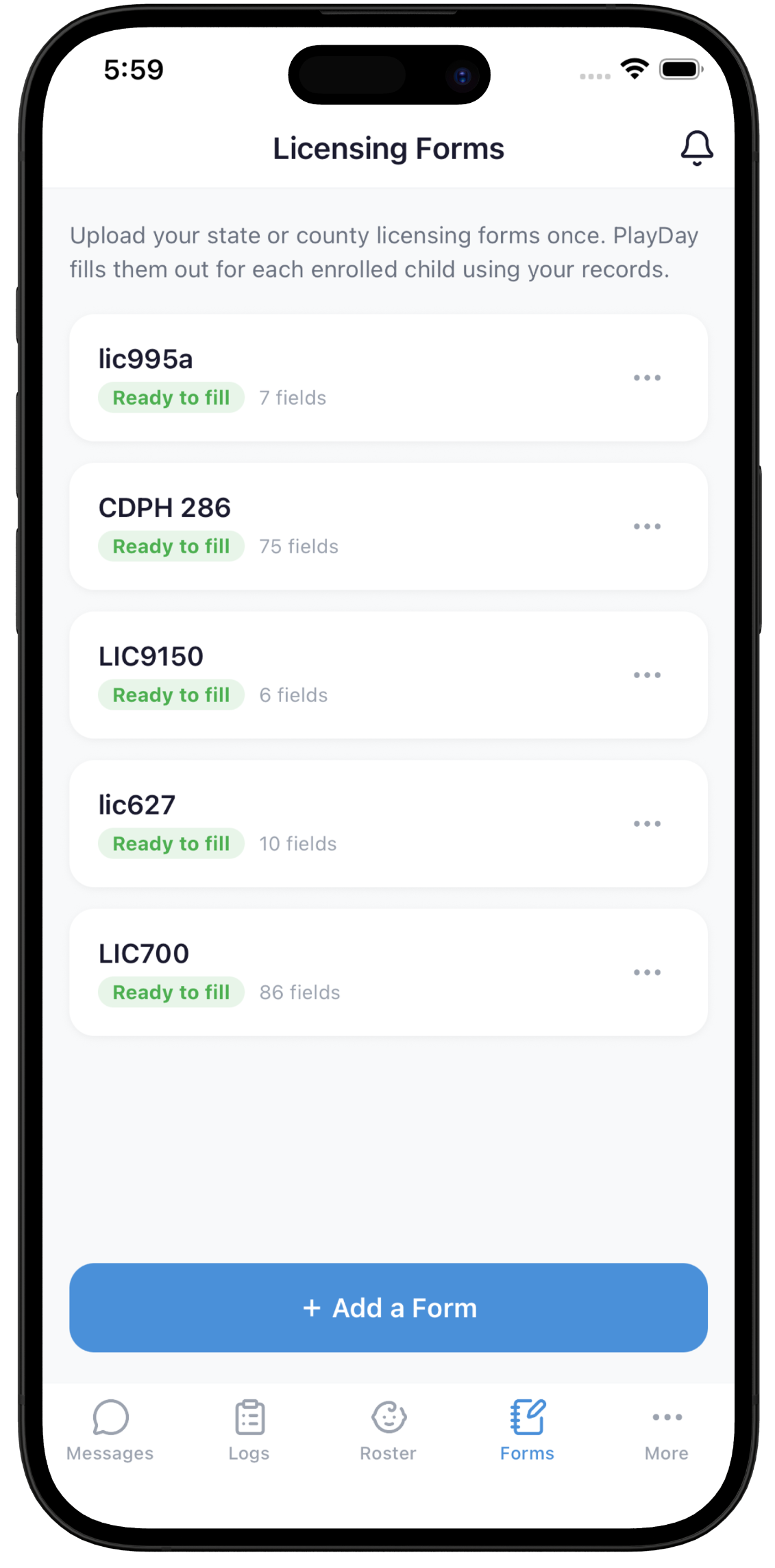
PlayDay licensing forms screenshot

One Pediarix shot fills in polio, DTaP and Hep B at once. Example with made-up details.

Any state’s forms, filled in seconds
Upload your licensing PDFs once and PlayDay maps their fields to your roster. Pick a child, get ready-to-submit documents — with anything uncertain flagged before you sign them.
A photo of the shot record is enough
Photograph the paper record from the pediatrician, or screenshot the patient portal. Every dose date lands on the immunization form, with combination shots like Pediarix correctly credited across polio, DTaP, and Hep B — the part that’s easiest to get wrong by hand.
Parent contracts from your own policies
Hours, rates, sick policy, closures — turn the rules you already have into a clean parent contract in minutes instead of rewriting a template.

Web app

Same account either way. Logs and messages are two taps while you’re on the floor with the kids. Invoicing, licensing forms and CACFP reports are easier to power through on a laptop once everyone’s gone home.
📱 During hours Roster & logs Messaging
💻 After hours Invoicing Licensing forms CACFP reports Timesheets
PlayDay web app invoices screen

Also included

👥 Bring your assistants
Invite staff by email. Everyone can log the day, and you choose who can also message parents, view child details, or see the calendar.
🩺 Specialist visits
Log speech, OT, and other therapist visits alongside the rest of the child’s record.
📊 Reports on demand
Export any child’s activity log by date range as CSV or PDF.

How PlayDay compares

Brightwheel, Procare, and Playground are priced per enrolled child and built around directors, classrooms, and staff ratios. Here’s what changes when the software is built for a home daycare — you, plus maybe an assistant.

PlayDay
Brightwheel & Procare
Playground
What it costs
PlayDay$9.99/mo flat — every feature, unlimited children
Brightwheel & ProcarePer enrolled child, usually quote-based
PlaygroundPer enrolled child, priced by plan
What’s included
PlayDayEverything — plus every feature we ship later
Brightwheel & ProcareDepends on your tier; the rest are paid add-ons
PlaygroundSplit across plans and paid add-ons
Getting started
PlayDayStart on your own in minutes
Brightwheel & ProcareBook a demo, talk to sales
PlaygroundSign up online, or book a demo
Who it’s shaped around
PlayDayYou and your assistants, in one home daycare
Brightwheel & ProcareDirectors, classrooms, and staff ratios
PlaygroundCenters and preschools first
Logging the day
PlayDayLog the whole group at once — or just say it
Brightwheel & ProcareTap through a form per child, per event
PlaygroundTap through a form per child, per event
Food program (CACFP)
PlayDayComponents tracked as you log each meal
Brightwheel & ProcareAdd-on, limited, or not offered
PlaygroundAvailable, depending on your plan
Licensing paperwork
PlayDayState PDFs autofilled, flagged for your review
Brightwheel & ProcareLook up each child, retype into the PDF
PlaygroundStores your files; you still fill the PDFs
Enrollment
PlayDayCustom online intake form, or scan the paper ones
Brightwheel & ProcareOnline intake forms
PlaygroundOnline intake forms
One price. Every feature. Including the ones we haven’t built yet.
$9.99 a month is the whole product — and everything we add later is already yours.
No upsells No math No pressure
See the full comparison → PlayDay vs. Brightwheel, Procare, KidKare & Playground, feature by feature

See what your evenings look like without the paperwork.

Start 2027 with your evenings back.

14 days free with your real families and your real forms. No credit card, no sales call, cancel anytime.

Start by December 31 and try PlayDay free for 3 months. That’s $29.97 you don’t pay, then $9.99 a month. No credit card, no sales call, cancel anytime.

Start your free trialTry 3 months free

PlayDay app icon Get the PlayDay app
Download PlayDay on the App Store Get PlayDay on Google Play
PlayDay logo layDay
Compare Terms Privacy Delete account
© 2026 PlayDay